



Updated September 22, 2026.
Driver exoneration means using objective evidence, usually video paired with GPS and vehicle data, to show that your driver did not cause a crash or did not do what a claim alleges. When a false accident claim arrives, a clear clip with an accurate timestamp and location can settle the fault question quickly instead of turning into a months-long dispute over conflicting stories.
But exoneration only works if three things are true: the camera captured the right view, the footage still exists when the claim shows up, and you can prove it hasn't been altered. This guide covers all three, plus what to do when a claim lands on your desk, how to use the same footage for coaching, and a policy checklist for fleet, safety and risk managers.
This is general information, not legal advice. Evidence preservation duties and admissibility rules vary by jurisdiction. Involve your insurer and counsel as soon as a claim or lawsuit is likely.
What Driver Exoneration Actually Means
In a fleet context, exoneration is the moment your evidence changes the answer to "who was at fault?" It can happen at several points:
- At the scene or same day, when a supervisor reviews footage and tells the insurer exactly what happened.
- At first notice of claim, when the carrier compares the other party's account with the video.
- During negotiation, when footage narrows a dispute over speed, lane position or signal timing.
- In litigation, when preserved footage and data become exhibits.
Exoneration is not the only valuable outcome. Sometimes video shows shared fault, which still helps you settle on accurate terms. Sometimes it shows your driver made a mistake — and knowing that early is better than learning it in a deposition.
How a False Accident Claim Usually Arises
Not every disputed claim is fraud. Many disagreements come from honest people remembering a fast, stressful event differently. The fleet manager's job is to have evidence that doesn't depend on memory.
Common situations where video settles the question:
- Lane-change and sideswipe disputes, where each driver says the other drifted.
- Rear-end collisions where the other driver says your truck stopped suddenly or rolled back.
- Backing and low-speed yard incidents, often with no independent witnesses.
- Intersection disputes over who had the light.
- Late-reported claims, where someone alleges damage or injury days or weeks after a trip.
- Passenger injury claims on buses and shuttles, such as a slip or fall while boarding.
- Suspected staged or deliberate collisions, where objective evidence matters most.
For the late-reported and passenger claims, the difference between "we have the footage" and "it was overwritten" is often the whole case.
What Footage Actually Matters
Different claims need different views. A single forward camera answers some questions and not others.
| Evidence | What it proves | Claims it helps with |
|---|---|---|
| Forward road view | Lane position, following distance, signals, other vehicles' movements | Rear-end, intersection, sideswipe |
| Driver/cab view | Driver attention, hands on wheel, reaction to the event | Distraction allegations, "driver was on the phone" |
| Side and rear exterior views | Blind-spot contact, backing, cyclists and pedestrians | Sideswipe, backing, right-turn incidents |
| Passenger-area interior | Boarding, falls, altercations | Passenger injury and conduct claims |
| GPS location and speed | Where the vehicle was and how fast it was moving | Speed disputes, "vehicle was never there" claims |
| Driving events (harsh braking, speeding) | What the vehicle did in the seconds before an event | Sudden-stop and aggressive-driving allegations |
| Vehicle diagnostics | Vehicle condition around the event | Mechanical-failure allegations |
The strongest cases combine at least two sources that agree with each other — for example, forward video showing a car cutting in, plus speed data showing your driver was under the limit and braked promptly.
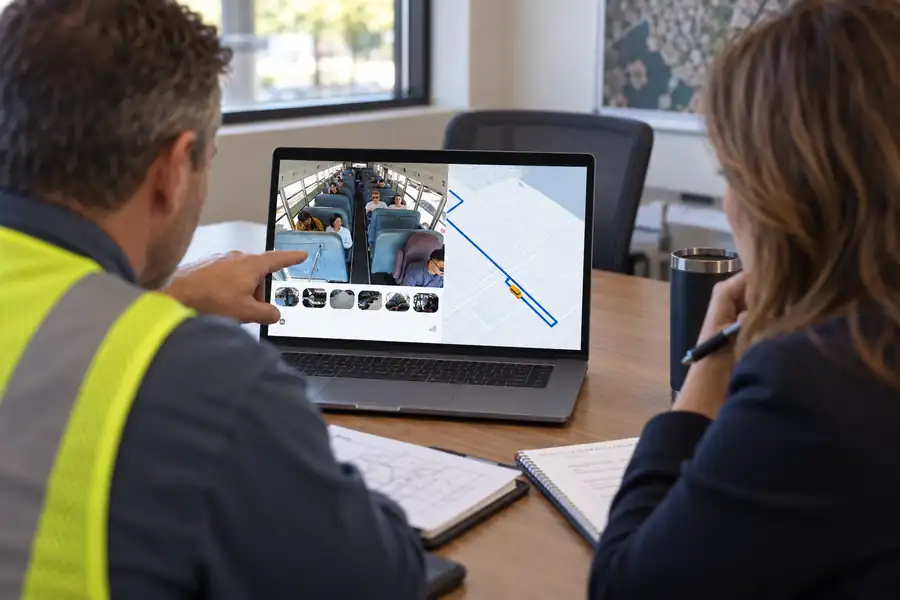
Why Time Sync, GPS and Speed Overlays Matter
A clip without reliable time and place is a story, not evidence. Opposing counsel will ask when the recording was made, where the vehicle was, and whether the clock was right.
What to look for in a system:
- Automatic clock sync so every camera on the vehicle and every vehicle in the fleet share the same time reference.
- GPS paired with video, so each frame can be tied to a location on the trip.
- Speed and event data on the same timeline as the footage, not in a separate report you have to line up by hand.
- Multiple camera angles on one timeline, so a reviewer can switch views without guessing about offsets.
- Export that preserves this metadata, not just an MP4 with the context stripped out.
When you evaluate systems, ask the vendor to show a real exported incident package and explain how the time and location data is recorded.
Preserving Footage: Spoliation and Chain of Custody
Footage that no longer exists cannot exonerate anyone. And footage that disappears after a dispute starts can hurt you.
"Spoliation" is the destruction or failure to preserve evidence that should have been kept. In federal civil cases, Federal Rule of Civil Procedure 37(e) addresses electronically stored information that "should have been preserved in the anticipation or conduct of litigation" and is lost because a party "failed to take reasonable steps to preserve it." Courts can order measures to cure the prejudice and, if a party acted with intent to deprive the other side of the information, may presume the lost information was unfavorable, instruct the jury accordingly, or dismiss the case or enter a default judgment. State courts have their own rules.
Two practical lessons follow:
- The duty to preserve can start before a lawsuit is filed — when litigation is reasonably anticipated. A serious crash, an injury or a letter from an attorney can be enough — ask counsel where the line is for your fleet.
- Automatic overwrite doesn't excuse you once that duty exists. If your system deletes footage on a fixed cycle, you need a process that stops deletion for relevant clips.
Chain of custody basics
Chain of custody is the record showing who handled the evidence, when, and what they did with it. For video, that means:
- Saving the original clip as it was recorded, not only an edited or trimmed version.
- Logging who accessed, downloaded or shared the footage.
- Keeping any redacted or blurred copies separate from the preserved original.
- Recording how the file was delivered to the insurer, counsel or police.
Cloud platforms with audit logs and controlled sharing make this easier than pulling SD cards from vehicles and passing files around by email.
What to Do When a Claim Arrives: A Step-by-Step Process
Speed matters because footage retention is finite. Build this into your incident procedure.
- Log the claim immediately. Record the date, time, location and vehicle, and who reported it.
- Issue a preservation hold. Stop deletion of all footage and data for the vehicle, time window and any nearby vehicles that might have captured the event.
- Pull the full window, not just the moment. Save several minutes before and after, from every camera on the vehicle, plus GPS, speed and driving-event data.
- Review before anyone gives a statement. Have a trained reviewer watch the footage before the driver or manager discusses fault with the other party.
- Talk to the driver. Get their account while it's fresh and compare it with the video. Treat this as fact-finding, not discipline.
- Package the evidence. Export clips with timestamps and location, add a short written summary, and note who prepared it.
- Share through controlled channels. Send to your insurer and counsel using access-controlled links or secure delivery, and log it.
- Blur where appropriate. Redact bystanders or passengers in copies shared outside the company, while keeping the unredacted original preserved.
- Close the loop. Record the outcome and whether the footage was decisive. That record is how you'll measure the program's value later.
When the Video Shows Your Driver Was at Fault
An honest video program cuts both ways, and that's a strength. If footage shows your driver was at fault, you learn it early, your insurer can resolve the claim faster, and you avoid defending a position that will collapse in discovery.
Handle these cases with the same preservation discipline as exonerations. Then turn the event into coaching and, where your policy calls for it, into consistent corrective action. Drivers are more likely to trust a camera program that defends them in disputes and is applied fairly when they make mistakes.
Using the Same Footage for Driver Coaching
Exoneration and coaching use the same evidence. A clip that clears a driver of a sideswipe claim may also show following distance that could be improved. Good coaching programs:
- Lead with context. Review the full clip, including what other road users did.
- Recognize good driving. Share clips where a driver avoided a crash or handled a hazard well.
- Focus on patterns, not one-off events — repeated harsh braking at the same depot exit is a route or training issue.
- Keep it private. Coach one-on-one; don't play clips for the whole break room.
- Document it, so coaching records show the fleet responded to known risks.
Before you roll out cabin-facing cameras for coaching, check the notice, audio-consent and bargaining rules in our guide to dash cam laws by state. California, for example, requires employers to provide employees who drive for hire with unedited copies of video event recorder recordings on request, free, within five days, under Vehicle Code 26708(b)(13).
The Insurance Conversation
Insurers and brokers care about evidence, and a documented video program is a useful topic at renewal. Monarch won't quote savings figures here, because they depend on your fleet, carrier and claims history, and any number without your data behind it would be a guess.
What you can bring to the conversation:
- Your written camera and retention policy, including how preservation holds work.
- Examples of claims where footage changed the outcome, with personal details redacted.
- Your coaching process and evidence that it's followed.
- How quickly you can deliver footage after a first notice of loss.
Ask your broker what evidence the carrier wants, in what format, and how fast. Then set your process to meet it.
Where Verkada Transportation Fits
Verkada Transportation, announced in September 2026, brings vehicle video into Verkada Command, the same platform Verkada uses for building security. For claims work, the features Verkada documents that matter most are:
- Driving events with context. On its transportation gateway page, Verkada says the system can "automatically flag driving events, including speeding, harsh braking, and sharp turning" and "use paired footage and location to audit claims or coach drivers with full context."
- GPS video search. Click a location on a vehicle's trip to surface associated footage.
- Remote access. Verkada says footage can be accessed "even when the vehicle is off by backing up footage to the cloud or temporarily waking the gateway."
- Crash resilience. Verkada says footage is processed and saved up to the moment of impact, even if a collision causes sudden power loss.
- Controlled sharing and blurring. Face blurring, role-based permissions, and sharing "with timed and revocable access."
- Interior and exterior coverage from fisheye, dome and exterior wedge camera models, which Verkada says can secure areas "inside or outside a vehicle."
Verkada describes these cameras by form factor rather than as a traditional windshield dash cam, so map your camera positions to the claim types in the table above. For forward-view options, see our guides to the best commercial truck camera systems and fleet vehicle dash cams. If you're weighing platforms, our Samsara alternatives comparison covers the trade-offs.
Monarch Connected is an authorized Verkada reseller. The Transportation line was announced in September 2026; contact us for availability, or learn more on our transportation security page.

Driver Exoneration Policy Checklist
Use this checklist to make sure footage will be there, and be credible, when a claim arrives.
- Map camera views to the claim types you actually see (road, cab, sides, rear, passenger area).
- Confirm every camera and vehicle shares synchronized time and GPS.
- Set a routine retention period and document it in writing.
- Define what triggers a preservation hold: crash, injury, complaint, attorney letter, police request.
- Name who can issue a hold and how quickly it must happen.
- Preserve originals; keep redacted copies separate.
- Turn on access logging and use controlled, revocable sharing links.
- Write a review procedure so footage is seen before anyone discusses fault externally.
- Give drivers written notice and handle audio consent and union obligations.
- Train supervisors on evidence packaging and the claims process.
- Agree with your insurer and counsel on format and delivery for evidence packages.
- Track outcomes so you can show the program's value at renewal.
The Monarch team can help you plan camera coverage and settings around this checklist. Talk to us when you're ready.
Frequently Asked Questions
What is driver exoneration?
Driver exoneration is using objective evidence — typically video combined with GPS, speed and driving-event data — to show that a driver was not at fault or did not do what a claim alleges. It protects drivers from blame and helps fleets resolve claims on accurate facts.
How does dash cam footage help with a false accident claim?
Footage shows what actually happened: lane position, signals, following distance and the other party's movements. Paired with GPS and speed data, it can contradict an inaccurate account quickly, often before the dispute escalates.
How long should we keep fleet video for claims?
Set a routine retention period that fits your operations and claims patterns, and a preservation-hold process that stops deletion as soon as a claim or lawsuit is reasonably anticipated. Because some claims are reported weeks later, consider saving clips from every known incident right away, even if no claim has been made.
What is spoliation of evidence?
Spoliation is destroying or failing to preserve evidence that should have been kept for litigation. Under Federal Rule of Civil Procedure 37(e), losing electronically stored information you should have preserved can lead to court-ordered remedies and, if done intentionally, adverse inferences or dismissal.
Do driver-facing cameras help exonerate drivers?
They can. A cab view can show a driver was attentive, had hands on the wheel and reacted promptly — answering allegations of distraction. Check notice, audio-consent and labor rules before installing them.
Should drivers see the footage?
It's usually worth it. Reviewing clips with drivers builds trust and supports coaching, and some states require it: California requires employers to provide unedited copies to employees who drive for hire on request.
Can we share footage with the other party's insurer?
That's a decision for your insurer and counsel. When footage is shared, use controlled links, blur bystanders where appropriate, and keep the unredacted original preserved.