


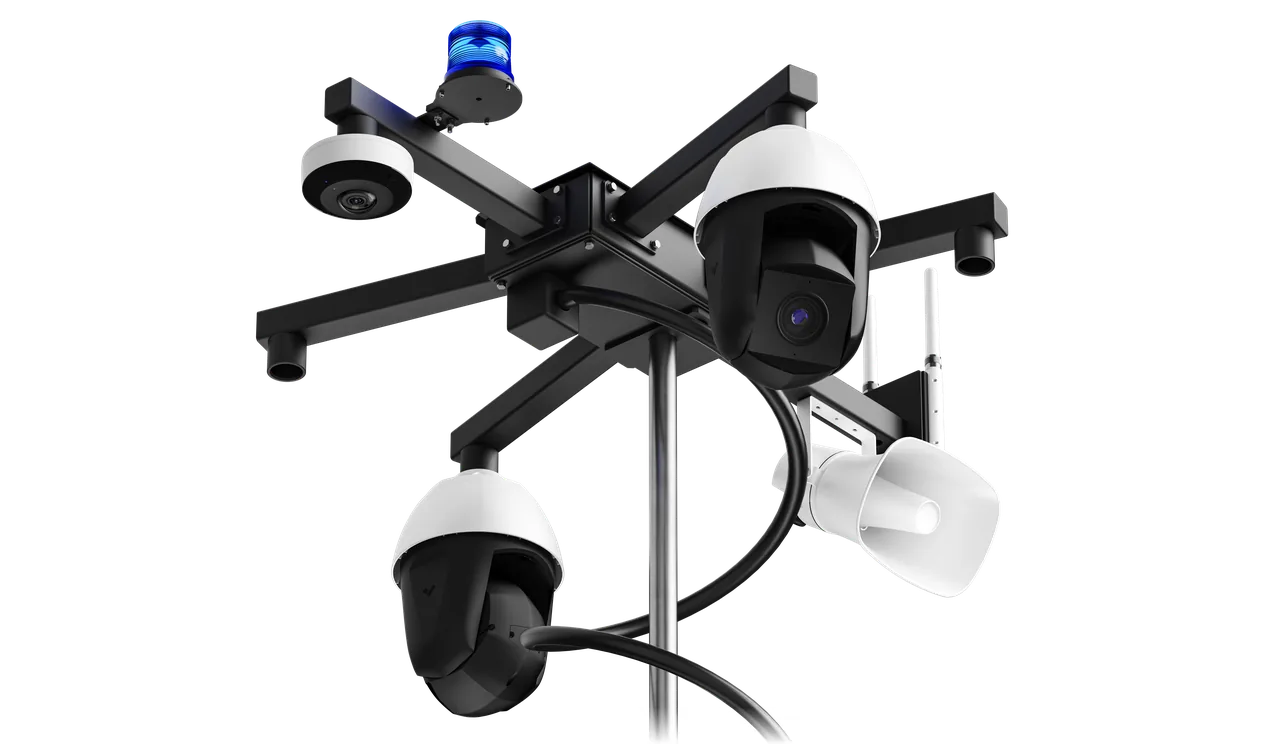
Updated September 16, 2026.
If you're researching the types of CCTV cameras available today, the shape of the housing is honestly one of the less interesting variables. What matters more is where you're pointing the camera, what light it's fighting, how far it needs to see, and what happens to the footage after it's recorded. A modest bullet camera in the right spot will outperform a top-tier multi-sensor in the wrong one.
This guide walks through the main camera categories, what each one is genuinely good at, and — just as importantly — where each one falls short. Along the way we'll cover the design and placement questions worth asking any integrator before you sign a quote.
Dome Cameras: The Ceiling Hemispheres Everyone Recognizes
Dome cameras are the half-globe fixtures mounted to ceilings in retail stores, hotel lobbies, and offices. They're common for good reasons: they mount cleanly to a flat ceiling, the tinted dome obscures which direction the lens is pointing, and they're relatively unobtrusive. That directional ambiguity matters — if someone can't tell whether the camera is watching the register or the exit, they have to assume it's watching both.
Where domes fall short: they can suffer from IR reflection at night (the camera's own infrared bounces off the inside of the dome, washing out the image), the housing can attract condensation in cold climates, and any smudge on the outside of the dome — dust, a spider web, a stray fingerprint — sits directly in front of the lens until someone cleans it.
Best fit: retail floors, hallways, receptions, elevators, and conference rooms — indoor overview where you want a discreet, ceiling-mounted presence.
Bullet Cameras: The Ones That Actually Look Like Cameras
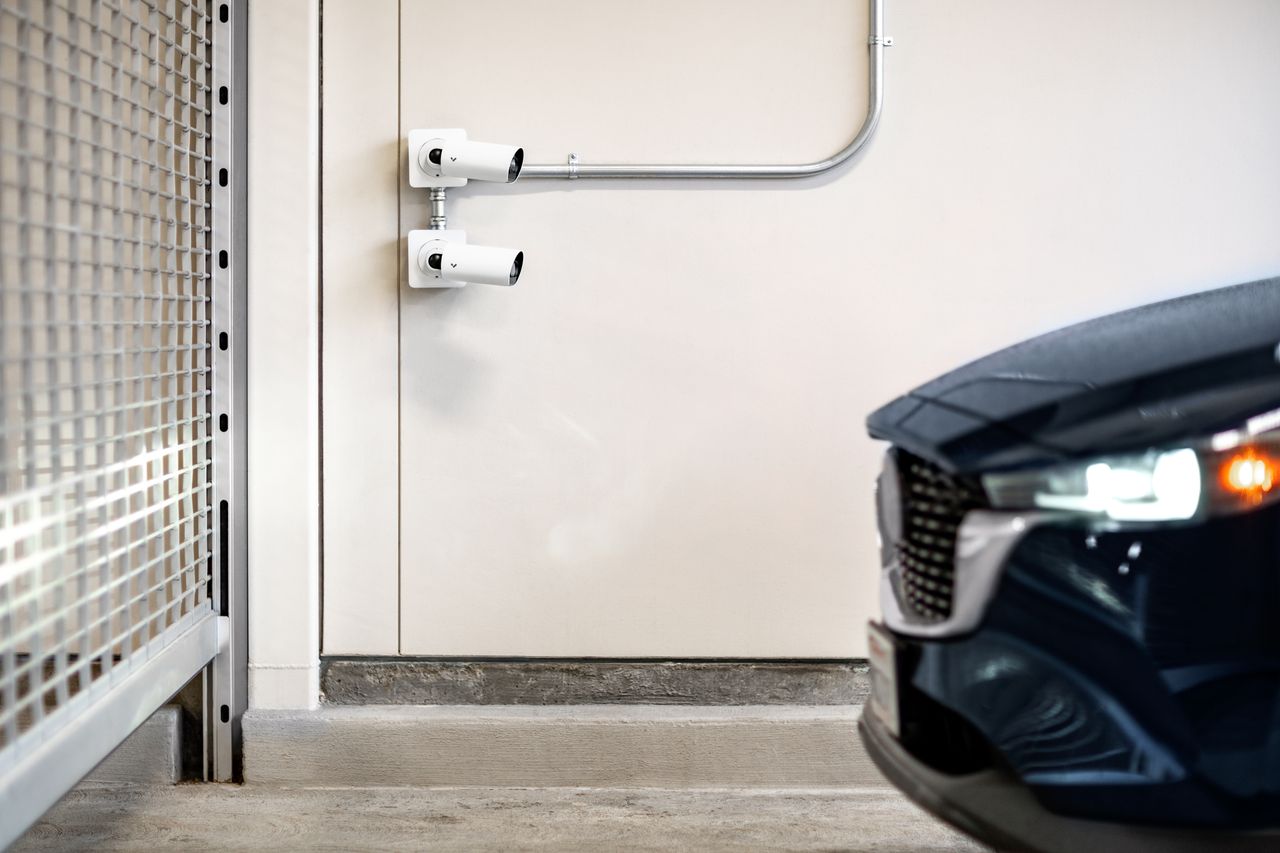
Bullet cameras are the cylindrical, obviously-a-camera fixtures you see under eaves and on parking lot poles. Where domes hide, bullets announce. That visibility is the point when deterrence is a goal — the Security Industry Association notes that overt bullet-style cameras "often work in efforts to discourage unwanted activity" because subjects know they are under surveillance (SIA guide to camera types).
Their longer housings accommodate longer lenses, which helps with distance viewing, and most include a built-in sunshade over the lens — useful whenever the camera is pointed anywhere near the horizon. The tradeoffs: the obvious visibility that helps with deterrence also makes them an easier target for tampering when mounted low, and the fixed viewing angle can only be adjusted by physically repositioning the camera.
I've written a separate breakdown on choosing between dome and bullet cameras because it's a common question, and the answer genuinely depends on what you're trying to accomplish.
PTZ Cameras: Pan, Tilt, Zoom, and a Human in the Loop
PTZ stands for pan-tilt-zoom, and these are cameras that physically move. An operator (or an automated preset schedule) can swing the camera around, tilt it up or down, and zoom into detail across a wide area.
The tradeoff PTZ marketing rarely emphasizes: a PTZ is only looking at one place at a time. While it's zoomed into a suspicious car in one lot, it isn't watching anything else. The DHS CCTV Technology Handbook makes the same point, noting that PTZ cameras "are best deployed as a roving camera when other fixed angles also provide continuous coverage of specific areas of importance" (DHS CCTV Technology Handbook).
They're also the most expensive camera on this list by a wide margin, have moving parts that eventually wear, and need somebody actually operating them to justify the cost. An unmanned PTZ pointed at a fence is essentially an expensive bullet camera.
Best fit: larger sites with a live monitoring team — transit hubs, ports, casinos, big-box retail loss prevention.
Turret Cameras: The Underrated Middle Ground
Turret cameras (sometimes called "eyeballs" or "mini-domes") sit somewhere between a dome and a bullet. The lens sits in an exposed ball inside a fixed base, so you get most of the discretion of a dome without the clear-dome housing in front of the lens.
That last part matters at night. Dome cameras with built-in infrared can suffer from IR bouncing off the inside of the dome; turrets don't have that issue because there's no dome material in the light path. Aesthetically they blend in almost as well as domes, and they're generally harder to smash than a dome but easier to defeat than a high-mounted bullet.
For general-purpose indoor and semi-sheltered outdoor use, turrets are probably the most underappreciated form factor available today.
Box Cameras: The One You Choose Your Own Lens For
Box cameras are the traditional rectangular design with a distinct lens on the front. They're less common in new small-business installs, but they remain the go-to when you need a very specific field of view, an unusual focal length, or a specialty lens.
The body typically doesn't include an outdoor-rated housing, so if you're mounting one outside you're also buying a separate enclosure — potentially with a heater, blower, or wiper depending on climate. That sounds excessive until you're trying to read a license plate through a Canadian snowdrift.
Best fit: purpose-built installs where an integrator is picking the lens to solve a specific problem — a long tunnel, a specific choke point, or a highway lane.
IP Cameras vs Analog: The One That Isn't Really a Type
Quick sidebar, because this trips people up. "IP camera" and "analog camera" aren't camera types in the same sense as dome or bullet — they describe how the camera transmits footage, not what it looks like or what it's built for. Every form factor above comes in both variants.
Analog (or modern HD variants like HD-TVI and HD-CVI) sends video over coaxial cable to a DVR. IP cameras send video over an ethernet cable — or Wi-Fi — to an NVR or straight to the cloud. IP is where new installs have landed: higher resolution, easier remote access, easier expansion, and the ability to power the camera over the same cable that carries the video (Power over Ethernet, or PoE).
Analog still has a place where coax is already run and you don't want to pull cable through finished walls. Starting from scratch, though, IP is generally the answer.
Wireless and Wi-Fi Cameras: Convenient Until They Aren't
Wireless cameras send video over Wi-Fi instead of a physical data cable. In a home on a well-covered residential network, this is convenient. On a commercial site with cinder-block walls, metal shelving, and dozens of other Wi-Fi devices competing for airtime, wireless installs frequently disappoint.
The other catch: "wireless" almost never means no cables. Most wireless cameras still need a power cable, so you've eliminated the easier cable to run (data) and kept the harder one (power). Battery-powered options exist, but batteries die, batteries perform poorly in cold, and someone with a ladder has to swap them.
For a small office, a home, or a temporary setup, wireless is fine. For a serious commercial deployment, a wired PoE install is almost always the right call.
Thermal Cameras: Heat Signatures Instead of Light
Thermal cameras don't record visible light — they record heat. Warm objects (people, engines, animals) appear bright; cool surfaces (concrete, glass, water) appear dark. This makes them very effective at detecting a person in total darkness, in fog, or in heavy rain, where conventional cameras struggle.
The SIA camera-type guide distinguishes thermal sensing from optical detail. Evaluate a thermal camera against the detection task and conditions it is designed for; do not assume its image provides the same identification detail as a visible-light view.
They're also expensive — often multiple times the cost of a conventional camera. For perimeter detection at a solar farm, fuel depot, substation, or any large outdoor site where missing an intruder is unacceptable, they earn their keep. A common deployment pattern is pairing a thermal camera with a conventional one on the same mount: thermal detects, conventional identifies.
ANPR / License Plate Recognition Cameras
ANPR (Automatic Number Plate Recognition, also called LPR in North America) cameras are purpose-built to capture a legible license plate on a moving vehicle. It sounds straightforward but isn't. Reliable plate capture requires a narrow field of view, a fast shutter to freeze motion, infrared illumination matched to plate reflectivity, and a lens focused at a specific distance range.
A general-purpose camera will occasionally get a readable plate. A properly-configured ANPR camera should read most plates reliably, day or night, at typical entrance speeds. Best fit: parking lot entrances, gated communities, dealership lots, industrial yards, and drive-throughs.
Practical buyer questions: What's the vehicle speed range the camera is rated for? What's the required lane width and camera-to-plate distance? Is plate-reading software licensed separately, and does the license renew?
Multi-Sensor and 360-Degree Cameras
Multi-sensor cameras combine multiple lenses into one housing — commonly three or four — each pointed in a different direction. The output can be stitched into a panorama or presented as separate feeds, giving one physical camera coverage that used to require several.
Fisheye 360 cameras take a different approach: a single wide lens covering an entire room in a donut-shaped image that software "de-warps" into a normal-looking view. The SIA describes this as a solution "for expanded coverage where the installation of multiple cameras may not be possible," while noting that "image distortion, as with all stitched and 360-degree cameras, is a factor to consider."
The main tradeoff is pixel density. That single sensor is spread across a large area, so zooming into a face across the room may disappoint. Multi-sensor and 360 shine for overview coverage of open spaces, not for detail work.
AI Cameras: The Category Reshaping the Rest
The last several years have shifted what "CCTV" means. Modern cameras can run object detection on the device itself — recognizing people, vehicles, license plates, and behaviors like loitering or line crossing — and flag only the footage that matters. That reduces the amount of empty footage a human ever has to review.
The shift is from passive evidence collection to proactive alerting. AI-based systems can notify staff or a monitoring service when a person crosses a defined perimeter at 3 a.m., rather than surfacing that clip only after someone thinks to look. We've written more on how AI cameras change the economics of security for businesses. The shorter version: a smaller number of well-placed AI cameras, actively monitored, does more than a larger number of dumb ones nobody watches.
Buyer questions worth asking: Does the analytics run on-camera or in the cloud (and does that affect bandwidth or subscription cost)? What's the false-alarm rate on the specific detection you care about? Can rules be tuned per-camera and per-time-of-day?
Covert and Specialty Cameras
Covert cameras hide inside other objects — smoke detectors, clocks, exit signs, ceiling tiles. Legal boundaries here are real and vary by jurisdiction. Bathrooms, changing rooms, and any private area are universal no-go zones, and audio recording adds a separate layer of consent law. Consult a lawyer familiar with your province or state's rules, not a camera vendor, before deploying covert equipment.
Beyond covert, specialty categories include explosion-proof housings for oil and gas, corrosion-resistant marine housings, mobile-mounted cameras for buses and trucks, and body-worn cameras. If your environment is unusual, there's usually a camera built specifically for it — and it's almost always cheaper long-term to buy the specialty model than to try to make a general-purpose one survive.
Comparing the Main Types Side by Side
A scan-friendly summary of where each common type earns its price tag. Use it to narrow down before getting into specific model numbers.
| Camera Type | Best For | Watch Out For | Rough Price Tier |
|---|---|---|---|
| Dome | Indoor overview, retail, hallways | IR reflection at night, dome smudging | $ |
| Bullet | Outdoor perimeter, long-distance viewing, visible deterrence | Vandalism if mounted low | $ |
| Turret | Indoor + sheltered outdoor, night image quality | Slightly less discreet than dome | $ |
| Box | Custom lens requirements, specialty installs | Needs separate outdoor housing | $ |
| PTZ | Large sites with live operators | Only watches one spot at a time | $$ |
| Thermal | Perimeter detection in darkness, fog, rain | High cost, low visual detail | $$ |
| ANPR / LPR | Vehicle entry points, plate capture | Narrow field of view, single-purpose | $$ |
| Multi-sensor / 360 | Open floor plans, wide-area overview | Lower pixel density per area | $-$$ |
| AI-native | Proactive alerting, reduced review time | Requires modern network + storage | $-$$ |
Prices are directional — get real quotes from an integrator who's walked your site, not from a spec sheet alone.
How to Actually Choose: A Framework Instead of a Sales Pitch
Forget camera types for a moment. Answer these questions first, and the right hardware largely falls out on its own.
What are you actually trying to accomplish? "General security" isn't specific enough. Reducing theft at a specific loading dock is. Documenting slip-and-falls for insurance is. Capturing every vehicle entering the property is. Each of those points to different cameras, placements, and retention needs.
Where is the light coming from — and going? Cameras pointed toward the sun during the day or toward parking lot lights at night will backlight anything you care about and turn faces into silhouettes. This is one of the most common failure modes in DIY installs. Walk the site at the same times of day the incidents you care about tend to happen.
How far away is the thing you want to see? The relevant industry standard for image quality and identification distance is the BS EN 62676-4 application guideline, which defines pixel-density targets for operational tasks like detection, recognition, and identification (UK standards list for CCTV). Ask your integrator to specify which task each camera is designed for, and at what distance — "just get a 4K camera" without that context isn't a plan.
Who is watching the feed, and when? If nobody, then AI-based alerting isn't optional — it's the entire point. If a monitoring service, build the camera plan around what they need to see. If an on-site guard, fewer well-placed cameras beat a wall of tiny thumbnails. Human attention is usually the real bottleneck.
What's the network and power situation? Fresh cable runs favor PoE and IP. Existing coax favors HD-over-coax so you can upgrade image quality without repulling. Neither available? Then wireless plus solar for outdoor spots is a legitimate but more expensive per-camera path.
What are the local rules? Every jurisdiction has different privacy laws around where cameras can point, whether audio can be recorded, what signage is required, and how long footage can be retained. A quick check of your provincial or state privacy regulator before installing beats a lawyer's letter afterward.
Placement Beats Hardware
A mid-range camera in the right spot beats a top-tier camera in a bad one every time. A few placement principles worth applying regardless of what hardware you choose:
Cover entry points, not just middles. Every choke point — front door, back door, loading dock, gate, register, safe — deserves a dedicated camera at a height and angle where a person can't stay hidden under a ball cap. That usually means mounting closer to head height for identification cameras, not up in a corner staring at the top of everyone's skull.
Layer wide and tight. One wide camera for context, one tight camera for detail (register, gate, ATM, doorway). The wide gives you the story; the tight gives you evidence. Neither works well alone.
Plan coverage gaps and failure cases. Identify what happens if a camera is blocked, moved or unavailable. Where a second view is needed, demonstrate that it supports the intended task rather than using a universal overlap percentage.
Watch your lighting at night. A camera mounted directly under a bright light will backlight anyone standing in front of it. One under a dim bulb will show half the frame blown out and the other half black. Bring a flashlight and simulate the conditions before final placement.
Storage, Retention, and Why the Camera Is Only Half the System
The camera captures the image. Something has to store it, and someone has to be able to find it later. Skip this part and you've bought an expensive doorbell.
Two main paths. On-site recording (an NVR or DVR storing to hard drives) gives you full control, no monthly fees, and total privacy — but if the recorder is stolen along with everything else, so is your footage. Cloud recording survives site-level disasters and makes remote access trivial, but adds a monthly bill that scales with camera count and retention length.
Choose local, remote or combined storage around the required recovery and retrieval behavior. Set retention from documented incident-review needs and applicable obligations. Demonstrate the exact system’s recording, search and export behavior when a component is unavailable.
One boring but critical detail: someone has to verify that recording is actually happening. Automated health monitoring — the system telling you when a camera drops offline — is a feature worth insisting on, not a luxury. Discovering a camera has been offline for months only when you go to pull incident footage is a preventable failure.
Contact Monarch with the site requirements to discuss the next step.
FAQ
How many types of CCTV cameras do I actually need to know about?
Realistically, five: dome, bullet, turret, PTZ, and some flavor of AI-native camera. Everything else — thermal, ANPR, multi-sensor, covert — is a specialty tool for a specific problem. If you understand what those first five do well and poorly, you can have a productive conversation with any integrator without getting talked into hardware you don't need.
What's the difference between CCTV and IP video surveillance?
Traditionally, CCTV meant closed-circuit analog video sent over coaxial cable to a DVR — closed and self-contained. Modern IP video surveillance sends footage over an ethernet network to an NVR or the cloud, which enables remote access, higher resolutions, and integration with other systems. The industry has largely dropped the distinction and uses "CCTV" as a general term for all video surveillance, but almost every new install today is IP-based under the hood.
Do more megapixels always mean a better camera?
No. Megapixels only help if the sensor, lens, and lighting can actually use them — otherwise you're recording a bigger, blurrier image and paying more for storage. A well-tuned 2MP camera at the right distance beats a badly-lit 8MP camera. Ask about low-light performance, lens quality, and pixel density on your specific target area before fixating on the megapixel number.
Are wireless CCTV cameras a good idea for a business?
For small, single-room setups they can work, but for real commercial deployments they're rarely the best choice. Wi-Fi competes with everything else in the building, most "wireless" cameras still need a power cable, and battery-powered options can die at inconvenient moments. If you're spending real money on cameras, running PoE cable removes Wi-Fi as a point of failure.
Can CCTV cameras actually prevent crime, or only record it?
Older camera systems were essentially witnesses — they captured what happened for review afterward. Modern AI-powered systems, paired with active monitoring or automated alerting, can interrupt incidents in progress by flagging suspicious behavior in real time. The shift from passive recording to real-time detection is what separates a modern prevention setup from one that just documents the event you failed to stop.
How long should I keep CCTV footage?
Define retention with the person responsible for records, investigations and privacy. Account for applicable legal, contractual and insurance obligations. Size storage for that documented period and the actual recording configuration rather than applying a general industry default.
Are there legal restrictions on where I can install cameras?
Yes, and they vary by province, state, and country. Bathrooms, changing rooms, and any space with a reasonable expectation of privacy are universally off-limits, and audio recording adds a separate layer of consent law on top of video. Most jurisdictions also require visible signage informing people that video surveillance is in use. Check with your local privacy regulator before installing, not after.
What's the best CCTV camera for a small business on a tight budget?
For most small businesses, a mix of turret cameras indoors and bullet cameras covering entry points and the exterior gives strong coverage per dollar. Add AI-based alerting through the recorder or cloud service so someone actually knows when something happens. Skip PTZ and thermal unless you have a specific problem only they can solve — they're rarely the right first purchase.