

A fixed duress alarm at a staffed hospital registration desk passes acceptance when it clears three tests: the right people receive the alert, the alert names the exact desk, and someone clearly owns it after shift change. A button that powers on has not passed. It passes when the right responders get the right desk name, and that still holds after the people on the recipient list change.
This is a procurement and sign-off guide, not a shopping guide. If you're still choosing hardware, start with our breakdown of panic button systems for business. This guide also leaves out responder routes, desk layouts, and anything that would help someone work around the system. Authorized site staff should plan and run any exercise involving the button under your hospital's own procedures. The vendor shouldn't freelance one on a Tuesday, and a curious registrar definitely shouldn't.
Why the registration desk needs its own acceptance check
Registration is where the public and the hospital meet. Monarch's hospital security and duress solutions page describes fixed-point buttons as the option for "known hot spots like the ED registration desk." There's nothing to wear, charge, or remember. That convenience is the whole point, and it also hides a trap.
A fixed button never moves, so everyone assumes its identity never changes either. But desks get renumbered. Registration areas get remodeled. "Desk 2" becomes "the one by the window" in staff slang. Meanwhile the alert still says whatever someone typed during installation two years ago. Your acceptance test is the moment to lock in a name that matches reality and a process that keeps it that way.
The other trap is people. Fixed hardware stays put while the humans on the recipient list come and go. A configuration that worked perfectly on go-live day can quietly decay as staff leave, roles shift, and nobody updates the notification list. (Ask anyone who has inherited a shared inbox still forwarding to someone who retired.)
What a panic alarm system has to prove before you sign off
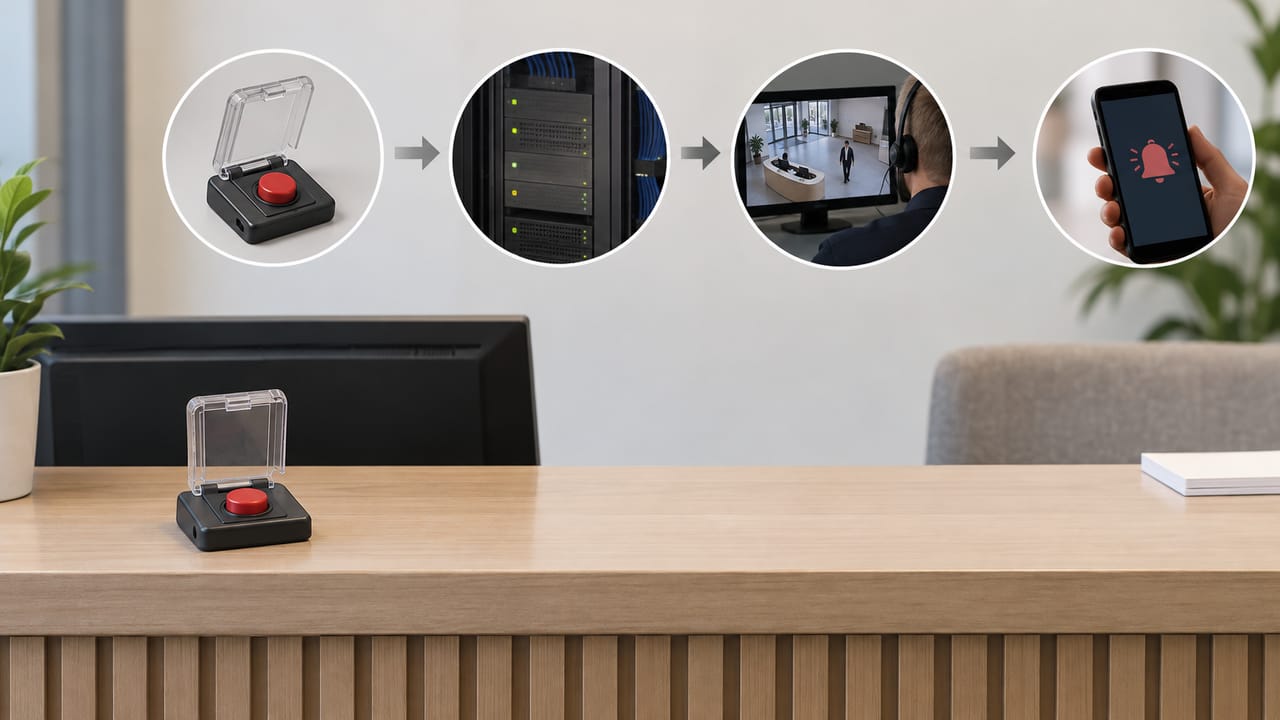
A panic alarm system turns one button press into a named, routed event. For a registration desk, sign-off should depend on evidence for each link in that chain, not on a demo of the button lighting up.
Here's a planning checklist you can adapt for your acceptance document. It's illustrative, not a regulatory requirement. Your compliance team, accreditor, and local authorities decide what you're actually obligated to do.
| Acceptance question | What to ask the integrator for | Evidence you keep |
|---|---|---|
| Who receives the alert? | Recipient list by role or group, with notification methods | Signed configuration export or screenshot set |
| Can responders identify the desk? | Naming convention and device-to-location mapping | Location register reviewed by security leadership |
| Is there camera context? | Which camera, if any, is paired to the button | Pairing record (kept private) |
| Who owns it after shift change? | Group-based routing and schedule settings | Handoff procedure approved by security director |
| Will you know if it breaks? | Health and tamper alert recipients | Health-alert recipient list |
| Who maintains it after go-live? | Named change-control owner | Change-control procedure in the contract |
Treat the right-hand column as your paper trail. If an auditor, a new security director, or future-you asks "how do we know this works?", the answer should be a folder, not a shrug.
Test 1: who actually receives the alert
Start with the recipient list, because a perfectly named alert sent to the wrong phone is just a very well-labeled tragedy.
On the Verkada platform, alerts are built in Command. According to Verkada's documentation on configuring alarm event alerts, you can add recipients "individually or assign the alert to a group." They can be notified by push, SMS, messaging platform alerts, or email. The same page lists "Panic Button Pressed" among the alarm sensor events you can alert on. It also notes that alerts "generate 24/7 by default" unless a notification schedule narrows them.
That gives you concrete review points:
- Is the alert routed to groups tied to roles, or to individual named people? Groups survive turnover better. Individuals tend to become a list of ghosts.
- Does each recipient have a notification method they'll actually see while working? An email-only alert to someone who lives on a radio should be a deliberate choice, not an accident.
- Has anyone narrowed the notification schedule? If so, who approved it, and why?
- Is the creator of the alert still on it? Verkada's docs note that by default "you will be an alert recipient." That means an installer's account can end up on your list unless someone removes it.
- Is the alert routed into an operations workflow? The same documentation describes a "Route to Operations" option that creates a ticket from the alert. If your team uses it, confirm where those tickets land.
Deliverable: a written recipient list, organized by role, reviewed and signed by security leadership. Put it in the contract so it isn't a favor.
Test 2: can the responder tell which desk it is?
This one sounds obvious until you've seen an alert named "Panic Sensor 3" (spoiler: nobody knows which one is 3).
The Verkada alert workflow asks you to "enter a descriptive name for the alert," and lets you scope alerts to be "device-specific, site-specific, or all devices." Those two settings matter a lot at registration. Here's what to review:
- Naming. The button's name and the alert's name should match the location label your responders actually use. Agree on a naming convention before install, and write it into the scope.
- Scope. A site-wide alert can be convenient. Verkada notes that when you select Sites or All Devices, "new devices added after alert creation will automatically generate alerts." That's handy, but a new device also inherits routing you designed for something else. Ask whether the registration button deserves its own device-specific alert.
- Camera context. Verkada's alarm sensors page says you can "pair any sensor with a Verkada or third-party cameras for video verification and context during an alarm." If a camera is paired with the desk button, confirm which one.
The location register and the camera pairing list belong in controlled documentation, stored with the same care as your door schedules. Ask your integrator to hand them over in a format you own, and keep them out of the public contract summary and any marketing case study.
Test 3: who owns the alert at shift change
Here's where things get weird. If the system was only tested at go-live by the day shift, the night shift inherits a system they've never seen fire, a recipient list they didn't write, and a registration desk that might be staffed completely differently.
Walk through a shift change on paper with your security lead and the system administrator, in this order:
- Check group membership. Open the recipient groups on the registration alert and confirm the incoming shift's roles are in them. Note whether ownership transfers through group membership automatically or depends on someone editing the system by hand.
- Check schedule coverage. If a notification schedule is in use, compare it against every hour the desk is staffed. A schedule built around "normal" hours at a desk staffed around the clock is a gap waiting for its moment.
- Check departing-account handling. Pick a recent staff departure and trace what happened to any alert tied to that account. If nobody can say, you've found the weak spot.
- Name the maintainer. Write down which role, not which person, updates the groups when staff join, leave, or change roles.
- Confirm the self-check. Verkada lists an alert type called "Misconfigured Response," which "detects missing contact or misconfigured alarm response." Ask whether it's enabled and who receives it. It covers missing contacts and misconfigured responses, not outdated recipients such as departed staff who are still listed, so keep reviewing group membership by hand when staff turn over.
What you walk away with is a one-page shift-handoff procedure, approved by the security director, that says who owns duress alerts on each shift and how ownership changes hands. Nobody reads page four anyway.
Contract deliverables worth putting in writing
Acceptance is easier when the contract already says what "done" looks like. Consider requesting these as named deliverables:
- A configuration record for the registration-desk button: device name, alert name, scope, recipient groups, and notification methods.
- A location register that maps each fixed duress button to its desk, kept as controlled documentation.
- Health and tamper alerting. The Verkada sensors page says you can "instantly get an SMS or email alert when a sensor is disconnected, tampered, or low on battery." Confirm who gets those messages.
- Power and connectivity documentation. Verkada's wired alarm panel page describes optional battery packs and LTE backup "to keep the system online during outages." If your design includes them, document that. If it doesn't, document that too.
- A coordinated acceptance exercise plan, written and run by authorized site staff. The vendor supports it and doesn't drive it.
- A change-control procedure covering how desk renames, remodels, and staffing changes get reflected in the system.
- Admin training for whoever will own recipient groups after go-live.
Notice what's missing: no response-time guarantees, no promises about how fast anyone shows up. Those depend on your staffing and procedures, not the hardware. Any vendor who promises them in a sales deck is selling optimism.
Review questions for the integrator walkthrough
Bring these to the pre-acceptance meeting. The answers will tell you a lot, and so will any hesitation.
- If we rename the registration desk next year, what has to change, and who changes it?
- Are recipients assigned by group or by individual? Show us.
- Is there a notification schedule on this alert, or does it run 24/7?
- Which health alerts are enabled, and who receives them?
- Is the button's alert device-specific or inherited from a site-wide rule?
- How do we export the configuration for our records?
- Who on your side supports us after go-live, and how do we reach them?
- What does your team need from our authorized staff to plan the acceptance exercise?
If the answer to "how do we export this" is a long pause, write that down too.
Where Monarch fits
Product boundaries matter, so here they are plainly. Verkada's published materials list panic button sensors, panic-button alert events, and camera pairing for alarm context. Monarch, a Verkada Authorized Reseller, offers a fixed registration-desk duress button as part of its hospital deployments. That's the scenario this guide is built around.
With that button, you can test the three things that matter at registration: desk identification, notification routing, and shift handoff. Your own authorized staff stay in charge of any exercise.
Monarch's healthcare work also puts doors and cameras on the same platform, which helps if you want duress events next to door and video records, though registration doesn't depend on it.
If you'd like a second set of eyes on an acceptance plan, or you're still scoping the desk button itself, talk to Monarch's healthcare security team. We'll start from your procedures, not ours.
FAQ
Can we accept the duress button if the vendor demo worked?
Not on that alone. A demo proves the button can generate an event. Acceptance should also confirm the recipient list, the desk name responders see, and who owns the alert on every shift. Ask for the configuration record and the handoff procedure before you sign.
Should duress alerts go to named people or to groups?
Groups tied to roles usually hold up better, because the group outlives any one employee. Verkada's alert setup supports both individual users and groups. Whichever you choose, name a role responsible for keeping membership current and write it into your procedures.
Who should run the acceptance exercise at registration?
Authorized site staff should plan and coordinate it under your hospital's own procedures, with the integrator supporting. Registration staff, security, and anyone else who might be affected should know about it in advance. The integrator shouldn't run an unannounced exercise on their own.
What happens if the button gets disconnected or tampered with?
On the Verkada platform, sensors can send SMS or email health alerts when they're disconnected, tampered with, or low on battery. The important part is who receives those alerts. Confirm that a named role gets them, and that the people who get duress alerts know about it too.
Does our state or accreditor require specific duress alarm testing?
That depends on your jurisdiction and accreditation, and this guide doesn't set those requirements. Check with your compliance team, your accrediting body, and the responsible local authorities. Then build their requirements into the acceptance plan alongside the checks above.
How is a fixed desk button different from a wearable?
A fixed button protects one known location and doesn't need to be worn or charged. A wearable follows the person. Many hospitals use both. For registration, the fixed button's main acceptance risk is location naming, while wearables raise more questions about who is carrying which device.