



Updated September 16, 2026.
A physical access control system (PACS) is more than an electronic lock. NIST defines it as a system that checks authorization at access points for people or vehicles (CSRC Glossary). If you're evaluating one for your building, it helps to understand what's happening between the credential in someone's hand and the strike releasing on the door.
This walkthrough covers the components, the trade-offs, and the questions worth asking a vendor before you sign anything.
What a PACS Is, in Plain Terms
A PACS decides — in real time — who can open which door, when, and under what conditions. It logs every attempt, successful or not. That audit trail is the main reason electronic systems have displaced mechanical keys in commercial and government facilities: a physical key doesn't tell you who used it or how many copies exist, and revoking access means collecting hardware. An electronic system revokes access with a database change.
The U.S. federal PACS reference architecture, described in IDManagement.gov's PACS 101 guide, breaks the system into a consistent set of components: access points, credentials, readers (with optional keypads and biometric capture), a control panel that makes the access decision, an access control server that manages enrollment and logs events, and a credential-holder data repository. Auxiliary systems — cameras, fire alarms, intrusion detection — are commonly integrated with the PACS.
The Four Layers Every System Has
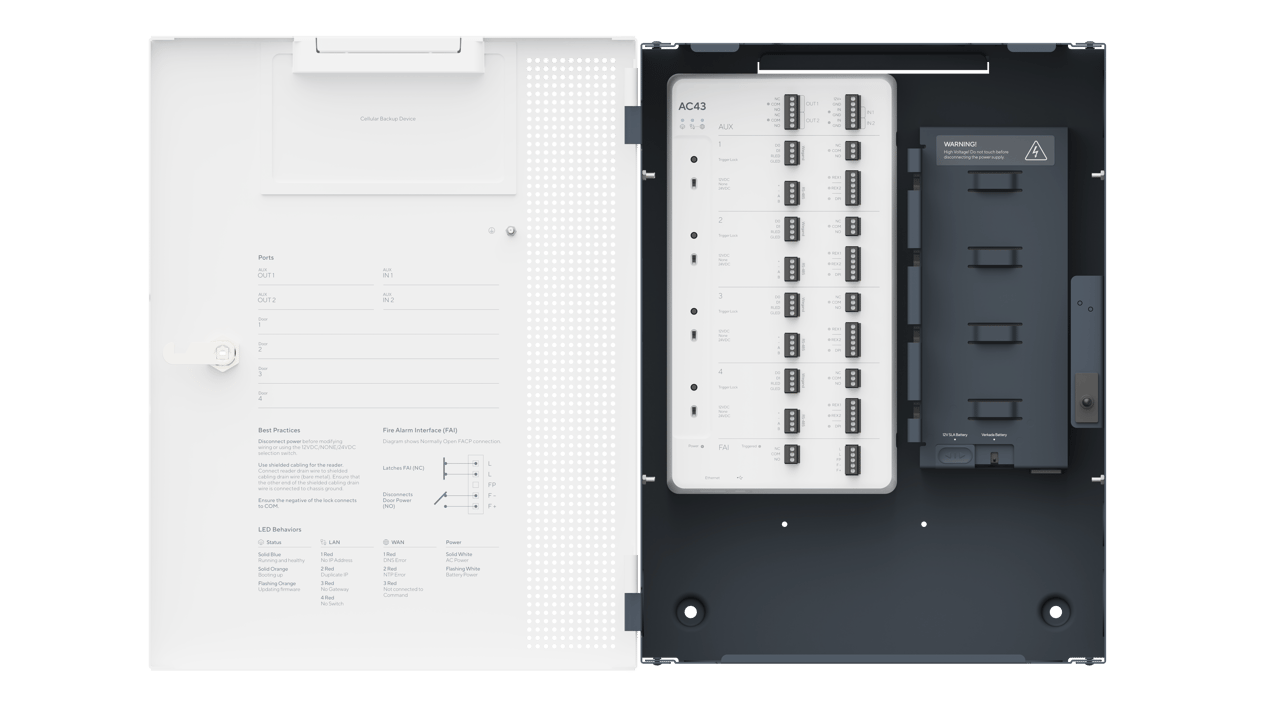
Every deployment, whether one door or hundreds, involves four layers:
- Credential layer: what the user carries — card, fob, mobile app, biometric, PIN.
- Reader layer: what recognizes the credential at the door.
- Controller layer: what makes the allow/deny decision and drives the door hardware.
- Management layer: the software where schedules, users, and reports live.
The credential and reader are the visible parts. The controller and management software determine how well the system holds up over years of adds, moves, changes, and staff turnover. For a policy-side companion, see our post on the three types of access control.
Credentials
Credentials are how the system identifies the person at the door. Common options include:
- Low-frequency prox cards (125 kHz): inexpensive and widely deployed, but the older formats offer no cryptographic protection and are trivially cloned with commodity hardware. Suitable only for low-risk interior doors.
- Contactless smart cards (13.56 MHz, e.g., DESFire EV2/EV3): support encrypted, mutually authenticated exchanges. This is the modern default for physical cards.
- Mobile credentials: the user's phone acts as the credential over Bluetooth or NFC. Harder to share casually, easier to revoke, and eliminates card printing.
- Biometrics: fingerprint, face, or iris capture, typically used as a second factor at higher-security doors.
- PINs: useful as a second factor. Weak as a sole factor because they are shared and written down.
Federal facilities use Personal Identity Verification (PIV) credentials, and PACS deployments are expected to align authentication strength with facility risk level. NIST SP 800-116 Rev. 1 defines three security-area categories — Controlled, Limited, and Exclusion — with progressively stronger authentication requirements. Commercial buyers can borrow the same logic: pick the authentication factors that match what's behind the door, not what's convenient at the reception desk.
Readers and the Wiegand-to-OSDP Shift
Readers do a narrow job: capture credential data and pass it to the controller. The choice worth paying attention to is the wire protocol between the reader and the controller. Legacy Wiegand transmits credential data in the clear and does not support supervision (the controller cannot tell if the reader has been removed or tampered with). OSDP, its modern replacement, supports encrypted communications and reader supervision. If a vendor is quoting Wiegand-only readers for a new install, ask why, and ask what the upgrade path looks like.
Form factor matters too. Mullion readers fit on narrow door frames; single-gang readers fit standard electrical boxes; long-range readers are used at gates and parking entrances. Get this right in the site survey rather than in the field.
Controllers
The controller is the panel — usually in an electrical or IDF closet — that holds the cardholder database and decides whether to release a door. A well-designed controller makes access decisions locally so that doors continue to function during a network or cloud outage; it then reconciles logs when connectivity returns. Ask any vendor exactly what happens to the doors when the internet is down.
Controllers come in single-door, multi-door (commonly 2, 4, 8, or 16 doors), and edge configurations where the controller function is combined with the reader and powered over Ethernet. Each approach trades off wiring cost, closet space, and per-door cost.
The controller also drives relay logic — how long the strike is energized, whether a valid read triggers a camera bookmark, whether an area's intrusion partition arms after the last authorized exit.
Integrating with Intrusion Detection and Cameras
Federal guidance explicitly contemplates integrating PACS with auxiliary systems such as surveillance, intrusion, and fire/evacuation (IDManagement.gov). In practice this means the same platform (or tightly linked platforms) handle badge events, alarm arming/disarming, and video review, so a "door forced open" event surfaces alongside the camera clip and the alarm-panel state — instead of living in three separate applications.
If you buy access control and intrusion detection from separate vendors that don't integrate, expect two apps, two audit trails, and reconciliation work every time something looks odd on the logs.
Door Hardware
The electronics are only as good as the door. Two dominant electric-lock types:
- Electric strikes replace the strike plate the latch drops into. Most are fail-secure: on power loss, the door remains locked and can still be opened from the inside via the mechanical lever.
- Magnetic locks (mag locks) hold the door with an electromagnet. They are fail-safe: on power loss, the door unlocks. Fire and life-safety codes govern where mag locks are permitted and how they must release; involve a code-literate integrator early.
Request-to-exit (REX) sensors tell the controller when someone inside is leaving so a normal egress is not logged as a forced-open event. Door-position switches (DPS) tell the controller whether the door is actually closed. Missing either creates either noisy false alarms or, worse, silent failures when a door is propped.
The door itself — frame condition, hinge alignment, gap tolerance — has to be right for any of this to work. Warped or misaligned doors are a common commissioning failure and are not the electronics vendor's problem to fix.
Management Software
The management software is where day-to-day work happens: adding and removing users, defining schedules, grouping doors, pulling audit reports, seeing who is currently on-site. Questions to weigh before choosing a platform:
- Cloud or on-premises? Cloud reduces server maintenance and enables remote administration; on-prem may be required in some regulated environments.
- Does it integrate with your HR or identity system so that terminations propagate automatically?
- Can you export the cardholder database in an open format if you leave the vendor? Data portability is a common gap in older systems.
- How are firmware updates delivered and tested?
Our access control catalog has examples of what a modern cloud-managed platform looks like in practice.
What Drives Cost
There is no honest one-line answer to "what does access control cost per door" without a site survey, and pricing varies widely by region, door condition, cable runs, and whether the building is occupied. Rather than publish invented numbers, here are the cost drivers to ask any bidder to break out line by line:
- Reader model and protocol (OSDP-capable vs. legacy).
- Controller architecture (per-door edge vs. multi-door panels) and spare capacity for growth.
- Lock hardware type and whether existing hardware is being reused.
- Ancillary devices per opening: REX, DPS, power supply share, battery backup.
- Cable pulls, conduit, and any required core drilling or fire-stopping.
- Commissioning, as-built documentation, and end-user training.
- Ongoing software licensing model (per door, per reader, per user) and whether firmware updates are included.
- Service and response-time terms.
Comparing two quotes without this breakdown is comparing nothing. The cheapest bid frequently omits commissioning, documentation, or backup power.
Compliance Considerations
Depending on the facility, several regimes touch physical access:
- HIPAA: healthcare facilities handling protected health information.
- PCI DSS: environments handling cardholder data.
- CJIS: law-enforcement and criminal-justice data environments.
- SOC 2: increasingly requested from SaaS vendors by their enterprise customers.
- Local building and fire codes governing egress and mag-lock release.
For federal facilities, the controlling documents are OMB M-19-17, NIST SP 800-116 Rev. 1, and the Interagency Security Committee's Risk Management Process, all summarized in the IDManagement.gov PACS 101 guide. Commercial deployments handling Controlled Unclassified Information (CUI) should also read NIST SP 800-171 requirement 03.10.07 on physical access control, which requires enforcing physical access authorizations at entry and exit points, maintaining audit logs, escorting visitors, and securing keys and other physical access devices.
Cabling, Power, and Backup
Cable and power problems are a common source of intermittent access-control faults. A few practical points:
- Composite cables (one jacket carrying reader, lock, REX, and DPS conductors) simplify installation but complicate future upgrades if a single pair fails or a protocol changes.
- Power supplies should include battery backup sized for the expected outage window. A brief utility blip that reboots a controller and drops a dozen doors offline is a preventable event.
- PoE at the door is increasingly viable with edge readers/controllers and reduces the number of separate runs, at the cost of PoE budget planning at the switch.
- Cable-run distances depend on protocol, gauge, and power draw. Confirm the specific limits with your reader and controller manufacturers before finalizing panel locations.
Ask for as-built drawings at commissioning. If the integrator can't produce them, the next technician you hire will bill you to reverse-engineer the wiring.
Visitor Management
Every deployment eventually needs a defensible answer to how visitors, contractors, and delivery drivers get in. NIST SP 800-171 requires that visitors be escorted and their activity controlled, and that physical access audit logs be maintained. In practice this usually means: pre-registration, a temporary credential (often a QR code delivered to the visitor's phone), scoped access to specific doors, automatic expiration, and a badge log tied to the host employee.
Tying visitor management into the same platform as employee access keeps everyone in one audit trail, which is what auditors and incident-response teams want. If you'd like to talk through options for your facility, our contact page is the fastest way to start.
Common Deployment Mistakes
A short list of failure patterns worth avoiding:
- Sizing controllers for today's door count with no headroom for planned expansion.
- Skipping a physical door-by-door survey. Not every door will accept an electric strike without frame work. Discover this before install week.
- Not defining failover behavior. Have a written answer for what happens when the network dies, when the cloud is unreachable, and when a controller fails.
- Leaving HR and access-control provisioning disconnected, so departing employees keep working badges until someone remembers.
- Selecting on lowest bid without comparing scope. The cheap quote usually wins by omitting commissioning, documentation, or backup power.
Where the Technology Is Heading
A few trends worth tracking without overreacting to:
- Mobile credentials increasingly replace physical cards as the primary credential, with cards as a fallback.
- Video verification of access events — the camera at the door bookmarks a clip on each badge read, making anomaly review faster.
- Edge architectures where the controller function collapses into a PoE-powered reader, reducing closet hardware.
- Tighter integration between PACS, intrusion, video, and identity systems, so a person's employment status, badge status, and physical location tell a single coherent story.
None of this changes the fundamentals covered above.
Questions to Bring to a Vendor Meeting
A practical checklist for evaluating any PACS bid:
- Do the proposed readers speak OSDP with encryption enabled? If not, why, and what is the upgrade path?
- What happens at the doors during a network outage and during a cloud outage?
- How does the platform integrate with our intrusion detection, cameras, and identity/HR system? Ask for a live demonstration, not a slide.
- How is cardholder data exported if we change vendors? Get the export format in writing.
- What is included in commissioning: as-built drawings, user training, a punch-list walk?
- Can we speak with three current customers of similar size — not showcase accounts?
- What is the service response time, and who owns firmware updates?
- Has every door in scope been surveyed and photographed, with lock type and condition recorded?
Answers to these will separate integrators who have done this work from those who are guessing.
FAQ
Do physical access control systems still work if the internet goes down?
A well-designed system continues to function at the door. Controllers cache the cardholder database locally and make access decisions at the edge, so authorized users can still badge in during an outage. What you lose is real-time visibility, remote administration, and cloud logging until connectivity returns. If a vendor's architecture requires every unlock to reach a cloud service, ask specifically what happens during an ISP outage.
How is a PACS different from just rekeying the locks?
Mechanical keys give you no audit trail, no way to revoke access without collecting hardware, and no per-person scheduling. A PACS logs every attempt, lets you disable a credential immediately, enforces time-of-day and zone rules, and integrates with intrusion and video systems. The lock is a mechanism; the PACS is a policy and logging system.
What is the difference between OSDP and Wiegand, and does it matter?
Wiegand is a legacy reader-to-controller protocol that transmits credential data unencrypted and does not supervise the reader. OSDP supports encrypted, bidirectional communication and reader tamper supervision. For a new deployment, OSDP is the more defensible choice. Ask any vendor quoting Wiegand-only readers to explain the reasoning and the migration path.
Can I reuse existing door hardware, or does everything have to be replaced?
Often existing electric strikes, mag locks, and door contacts can be reused if they're in good condition and meet current code. A door-by-door survey will identify what's serviceable and what needs replacement. Most modernizations reuse some mechanical hardware and replace readers, controllers, and management software.
How long does an installation take?
Timelines vary with scope, permitting, and building access. A small commercial site typically involves several weeks from contract to commissioning, including survey, procurement, cable pulls, and testing. Large campuses phase over months. The long pole is usually the survey, permits, and coordination with facilities — not the electronics themselves.
Do biometrics replace cards and phones, or complement them?
They typically complement them as a second factor at higher-security doors. Biometrics alone can be slow at high-throughput entrances and have false-reject rates that frustrate users. A common pattern is card or phone at general-access doors and card-plus-biometric at sensitive zones like data centers, cash-handling rooms, or research areas.
What ongoing costs should I expect after installation?
Recurring cost drivers include software licensing (usually per door, per reader, or per user), credential replacements as staff turn over, backup battery replacements on a scheduled interval, and a service agreement for hardware failures. Firmware updates are typically included in cloud licensing. Every several years, plan for partial hardware refreshes as standards evolve. Ask each bidder for a five-year total-cost-of-ownership projection so you're comparing lifetimes, not sticker prices.