

Back to Blog
Industry Insights

Intercom Speaker Setup That Doesn't Sound Like a Drive-Thru

Monarch ConnectedJuly 14, 202614 min read
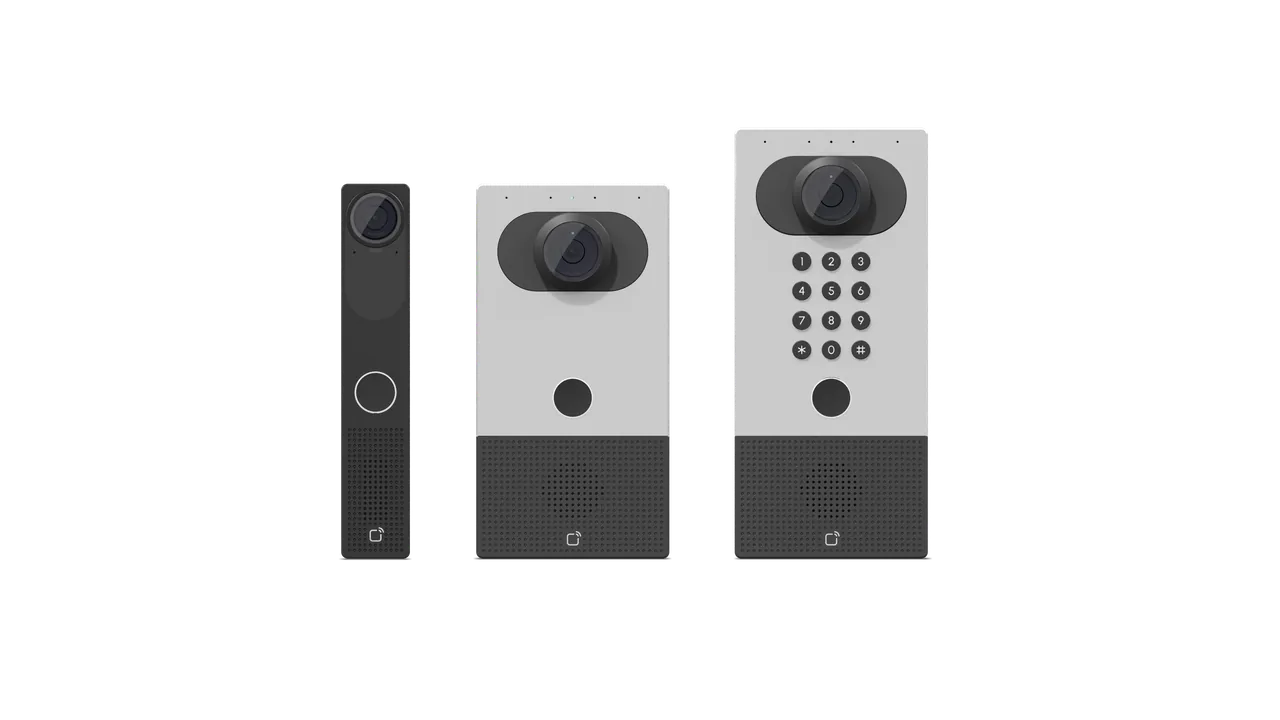
Three video intercom speaker units side by side, ranging from a slim black panel to a wide keypad model with numeric entry.

Intercom Speaker Setup That Doesn't Sound Like a Drive-Thru

Ever pulled up to a drive-thru, ordered a burger, and walked away with three tacos and mild emotional damage? (Same.) That's what a bad intercom speaker does to a building — except instead of tacos, it's your receptionist paging "Dr. Ramirez to the ER" and everyone hearing "Bring lasagna to the door." The intercom speaker is the tiny piece of hardware that decides whether your building sounds professional or sounds like a haunted McDonald's, and most people don't think about it until it's already embarrassing them on a Tuesday.

So let's fix that. This guide is the one I wish someone had handed me the first time I speced a commercial building with 40+ door stations, a paging system, and one very grumpy facilities manager. We'll go deep on what an intercom speaker actually is, how the modern ones differ from the wall boxes your grandpa yelled into, how to pick the right one for your building, and how to avoid the specific mistakes that get integrators fired.

Grab coffee. We're going in.

What An Intercom Speaker Actually Is (And Why It's Not Just A Speaker)

Here's the thing that trips people up. When someone says "intercom speaker," they usually mean one of three different animals:

  • The speaker component inside a door station (the thing you talk into outside a door).
  • The speaker component inside an indoor station (the thing that beeps when someone rings you).
  • A ceiling or wall-mounted paging speaker tied into the intercom system for zone announcements.

All three are "intercom speakers." All three have wildly different requirements. And if you buy the wrong one for the wrong job, you'll spend the next six months hearing about it from every single person who works in that building. (Ask me how I know. Actually, don't.)

Modern intercom speakers are network devices. They're not the analog cones that hung on the wall in your middle school. Most run over PoE (Power over Ethernet), speak SIP or a proprietary IP protocol, have built-in DSPs for echo cancellation and noise suppression, and yes — they often include a microphone, a camera, and access-control smarts baked into the same housing.

That last part matters. You can't really talk about intercom speakers without also talking about who's coming through the door, which is where a proper access control platform enters the story. The speaker isn't a peripheral. It's a doorway.

[switches to serious face]

If you're specifying gear right now, understand this: the speaker's audio quality is not the whole story, but it's the part every user judges the system on. Nobody says "wow, what a snappy TLS handshake." They say "I can hear the delivery driver." Prioritize accordingly.

The Anatomy Of A Modern Intercom Speaker

Let's peel one open. Not literally — please don't crack a $900 door station with a screwdriver just because a blog told you to.

A modern IP intercom speaker has, roughly:

  • A driver (the actual cone that pushes air). Size matters here. A 2-inch driver in a door station sounds fine in a quiet hallway and terrible on a windy loading dock.
  • An amplifier stage, usually Class D, tuned for voice frequencies (roughly 300 Hz to 3.4 kHz for telephony-grade, wider for HD voice).
  • A microphone array with beamforming, so it picks up the person in front and ignores the diesel truck idling behind them.
  • A DSP for acoustic echo cancellation (AEC), noise suppression, and automatic gain control. This is the unsung hero. Without it, your speaker howls like a wounded seagull.
  • The network stack — SIP, ONVIF Profile T for the video side, sometimes RTSP, sometimes a proprietary flavor.
  • Weatherproofing (IP65 or IP66 for exterior units), vandal resistance (IK08 to IK10), and an operating temperature range that actually matches your climate.

Skip any of those and you'll notice, usually at 4:47 PM on a Friday, when the CEO is trying to buzz someone in and gets a burst of static instead. According to the IP-rating standards documented by the IEC, an IP65 rating means dust-tight and protected against water jets — which sounds great until you realize your building has irrigation sprinklers that hit the door station at a specific angle every morning at 6 AM. Check the rating against reality, not just against the spec sheet.

Analog vs IP vs SIP: Pick The Right Fight

Time for the format war. There are still three real categories in the wild:

Old-school analog intercoms — two wires, a buzzer, and a lot of hope. They work, they cost almost nothing, and they'll outlive us all. But they don't integrate with anything, you can't record calls, and adding a station means running new copper. If you're building anything larger than a duplex, walk away.

Proprietary IP intercoms — the closed-ecosystem stuff. Sound quality is usually excellent (the vendor controls the whole audio chain), management is slick, and everything "just works" as long as you stay inside their walled garden. The trap is exactly what it sounds like: if the vendor discontinues a model or triples the license fee, you eat it.

SIP intercoms — the open-standard route. Any SIP-compliant intercom can register to any SIP server (3CX, Asterisk, FreePBX, Microsoft Teams via a gateway, RingCentral, you name it). This is the "future-proof" play, and for most commercial deployments, it's the right one.

Here's a quick decision table:

TypeBest forAudio qualityIntegrationTypical downside
Analog 2-wireSingle-door residential, retrofit where no cabling existsBasic voiceNoneNo recording, no scaling
Proprietary IPEnterprise campuses committed to one vendorExcellentDeep within ecosystem, shallow outsideVendor lock-in
SIP over PoEMost commercial buildings, multi-tenant, healthcare, schoolsVery good to excellentWorks with any SIP PBXRequires network hygiene

The "typical downside" column is where projects die. Nobody buys an intercom expecting the downside to matter. Everybody eventually meets it.

How To Pick An Intercom Speaker For Your Building

Alright, cards on the table — here's the actual selection checklist I use. Print it, tape it to your monitor, whatever.

  1. Where is it going? Interior climate-controlled hallway is a completely different animal than an exterior loading bay. Match the IP rating, IK rating, and operating temp to the environment. If it snows where you are, look for a heater option built into the housing.

  2. How far away will people be standing? A person leaning right up to the door station needs different acoustics than someone yelling from a car six feet back. Larger drivers, higher SPL ratings, and beamforming mics all matter more the further away the user is.

  3. How loud is the environment? Ambient noise levels above about 70 dB (a busy street, a machine shop, a hospital ER waiting room during flu season) demand a speaker that can push at least 90 dB at one meter, plus a good AEC/noise-suppression DSP. Otherwise you'll get feedback and everyone's yelling.

  4. What are you plugging it into? If your phone system is SIP-based, you want a SIP intercom. If you're standardized on Verkada, Axis, 2N, or another proprietary platform, stay in-family for the deepest integration.

  5. Does it need to talk to your access-control system? Almost always yes. Look for units that support Wiegand, OSDP, or (better) native IP integration with your reader/controller platform. The days of a separate intercom and a separate access reader on the same doorframe are ending. Combine them.

  6. Video or audio-only? Video is table stakes for exterior stations now. It's not just "who's there" — it's evidence, deterrence, and remote unlock verification.

  7. Recording and retention. If you're in a regulated industry (healthcare, finance, education), your intercom calls may be part of your records-retention obligations. Confirm the system can log calls, store audio, and export on demand.

  8. Vandal risk. If it's within reach of the sidewalk, spec IK10. If it's behind glass on the 4th floor, don't overspend on armor you don't need.

Also — and I say this as a budget check baked into the checklist — actually price the tiers before you shortlist. Entry-level SIP door stations with a basic speaker and mic run roughly $300 to $600 per door. Solid mid-range units with HD video, PoE, a wide-angle camera, and a decent DSP land around $800 to $1,500 — the sweet spot for most SMB commercial jobs. High-end vandal-resistant IK10 stations with hearing-loop support and an integrated access reader run $1,800 to $3,500 or more per door, which is what hospitals and large campuses actually spend. Add installation, Cat6A cabling (not cheap in commercial construction), SIP extension licensing, and cloud management subscriptions on top. A "cheap intercom" that skips those line items usually costs more within 18 months than the "expensive" one that included them upfront. If someone quotes you an intercom project without a line item for network readiness (VLAN, QoS, PoE budget audit), be suspicious — that's the line item that separates the systems that work from the ones that don't.

The Special Case: Intercom System For Hospital Environments

I'm going to give hospitals their own section because — and this is a personal opinion after too many site walks — hospitals are the hardest intercom deployments in the world. Not the largest. Not the most expensive. The hardest. Choosing an intercom system for hospital environments means you're threading a needle between HIPAA, infection control, ambient noise, hearing-impaired accessibility, 24/7 uptime, integration with nurse-call systems, and a workforce that's already juggling ten alarms per shift. No pressure.

A few things that make hospital intercom speakers different:

  • Surface material matters. Standard plastic housings harbor bacteria and can't survive daily bleach wipes. Look for antimicrobial coatings or medical-grade stainless-steel faceplates that hold up to hospital-approved cleaning agents.
  • Volume and clarity trump aesthetics. A pretty speaker that mumbles is useless when a code is being called. Prioritize a minimum 90 dB SPL and a wide, clear voice band.
  • Hearing-loop compatibility. Under ADA guidelines and echoing much of the guidance in the U.S. Department of Justice's ADA regulations, patient-facing intercoms should ideally support telecoil (T-coil) induction loops for hearing-aid users. Not every speaker does. Ask.
  • Redundancy. Hospital doors don't get to fail. Look for units that support dual network paths, PoE + local power backup, and can fail over gracefully to a local ring group if the SIP server goes down.
  • Integration with nurse call and paging. The intercom speaker at a patient-room door may need to serve triple duty as door station, code-blue announcement point, and staff paging channel. Not every unit can wear three hats.

If you're speccing for a healthcare facility, we've written more about how these pieces fit together on our healthcare security page. Short version: don't treat the intercom as a standalone box. It's a node in a life-safety network, and it needs to be designed like one.

Installation Mistakes That Ruin Otherwise Great Speakers

You can spec the world's best intercom speaker and still end up with a system that sounds like a raccoon in a coffee can. Here's how it happens.

Mounting height wrong. ADA guidance calls for operable parts between 15 and 48 inches from the ground. Most integrators know this. Most also forget that "operable" means the button — but the speaker and microphone need to be within acoustic range of a person at that height, not tuned for a six-foot-four security guard. Aim the acoustics at the human, not the fixture.

Mounting surface too resonant. Bolting a speaker directly to hollow-metal doorframe or thin drywall turns the whole surface into a secondary speaker — usually a very bad one. Use vibration-isolating gaskets. Every good manufacturer ships them. Nobody uses them. Be the exception.

Now let's talk about wind. Exterior stations facing prevailing wind sound like a hurricane report on a bad phone connection. Recess the unit slightly, add a windscreen accessory, or reposition to a sheltered wall. This isn't a "premium install" thing — it's just physics.

Power budget miscalculated. PoE Class 3 gives you 12.95 W at the device. Some intercoms with heaters, video, and full audio need PoE+ (25.5 W) or even PoE++. Undersized switches will brown-out the speaker under load, and the symptom looks exactly like a bad speaker — clipping, dropouts, random reboots. Check the switch, not the speaker.

And then there's the network. Voice over IP is unforgiving. If your intercom shares a VLAN with the guest WiFi and someone starts streaming a 4K movie, expect audio to fall apart. Segment your VLAN, mark voice traffic with DSCP EF, and give it QoS priority. This is boring, foundational network hygiene, and it is the single biggest reason IP intercoms sound bad in the wild.

Skipping the site walk. You cannot spec an intercom from a floor plan. You have to stand at the door, listen, feel the wind, note the reflective surfaces, and imagine the delivery driver at 2 AM in the rain. If you don't do that walk, you're guessing.

Integrating With Access Control, Video, And Paging

The best modern intercom speakers aren't standalone products anymore — they're endpoints in a unified security platform. When someone presses the button at the front door, ideally you want the following to happen in parallel: the intercom call routes to the right group, a video feed pops on the receptionist's screen, the access-control system pre-stages a temporary unlock permission, and a snapshot is logged to the audit trail.

Getting there means picking hardware that plays nice with everything else.

For most commercial buildings, that looks like:

  • Cameras and intercoms on the same manufacturer's platform, or on platforms with real API integrations (not "we have an API, good luck").
  • Access controllers that can accept a "unlock via intercom" event as a first-class action, not a hack.
  • A single pane of glass where the security team can see calls, footage, and door events on one screen. If your team is alt-tabbing between three apps to respond to a doorbell, you have failed.
  • Overhead paging integrated with the intercom so an "all-page" announcement uses the same speakers as a one-to-one call — no separate paging amplifier, no separate wiring run.

If you want to see what a full-stack version looks like across cameras, access, and communication, browse our product catalog and pay attention to which pieces are designed to talk to each other from day one. That interoperability is worth more than any single spec on any single speaker.

FAQ

Do I need a separate paging system if I already have intercom speakers?

Usually no, as long as your intercom system supports zone paging and your speakers are placed for coverage, not just for door-station use. Modern SIP intercoms let you dial a paging code and broadcast to a defined group of speakers. The catch is coverage — if your intercom stations are only at doors, they won't cover the middle of a warehouse floor. Add ceiling speakers on the same platform rather than bolting on a second system.

Can an intercom speaker work over WiFi instead of Ethernet?

Some models offer WiFi, but almost every serious integrator will steer you toward PoE. Wired Ethernet gives you power and network in one cable, avoids interference and roaming issues, and is far more reliable for life-safety and access-control roles. WiFi is fine for a residential doorbell; it's a bad idea for a commercial front door.

How long should an intercom speaker last?

Well-installed, name-brand IP intercom speakers typically last 8 to 12 years in interior applications and 5 to 8 years in harsh exterior environments. The speaker driver itself rarely dies — what fails is usually the housing seal on exterior units, or the platform reaches end-of-life for firmware support. Budget for a platform refresh, not just a hardware refresh.

What's the difference between a speaker with 2W output and one with 10W?

Rated wattage roughly corresponds to how loud the speaker can get before distorting. A 2W unit is fine for a quiet interior office door. A 10W unit is what you want on a noisy exterior dock, a parking garage, or a hospital ambulance bay. More watts also means more heat, more power draw, and often a bigger housing — so don't over-spec for a quiet lobby. Match wattage to ambient noise.

Will my intercom speaker still work if the internet goes down?

It depends on where the SIP server lives. If your SIP server is on-premise, an internet outage doesn't affect internal intercom calls at all — everything stays on the LAN. If your SIP server is cloud-hosted, intercom calls stop working during an outage unless you have local failover configured. For any building where the front door is a life-safety function, insist on either on-prem SIP or a documented local failover mode.

Can one intercom speaker cover multiple doors?

The speaker itself is tied to its location, but the call routing is separate. A single receptionist station can receive calls from dozens of door speakers, and a single door speaker can ring multiple receiving stations. What you cannot do is share one physical outdoor speaker between two doors — each door needs its own station so visitors know where to press and where to be seen on camera.

Related Solutions

Explore how Monarch Connected can help with your specific security needs.

Explore Our Products

Ready to Upgrade Your Security?

Talk to our experts about Verkada cameras, access control, and sensors — book a demo.

More Articles